
Microsoft 365 Copilot
The work Copilot quietly takes off your plate
First drafts in minutes instead of an hour. Meetings summarised before you have finished your coffee. An inbox that stops eating your morning. This is not theory. It is what Microsoft's own research found when they measured Copilot against the same tasks without it.
The Numbers
The measurable benefits of Microsoft 365 Copilot
These are not marketing claims. They come from Microsoft's own Work Trend Index research, which timed and surveyed real users doing real tasks with and without Copilot.
Across a mixed set of writing, searching and summarising tasks.
Catching up on a missed meeting. 11m 13s with Copilot versus 42m 34s without.
Say Copilot helps them get to a good first draft faster.
Say Copilot reduces the time they spend processing email.
Say Copilot saves time finding what they need in their own files.
Of early users said that once they used Copilot, they did not want to give it up.
By App
Where the time actually comes back
Word
the blank page problem
Copilot drafts a first version from a prompt, a set of notes, or an existing document. You are editing instead of starting from nothing. That is the difference between 8 and 14 minutes on a single first draft, and it compounds every time someone on your team writes something.
Outlook
the inbox that does not wait
Copilot drafts replies, summarises long threads, and surfaces what actually needs a decision from you. Most of an inbox is not a decision. Copilot sorts it so the part that is gets attention first.
Teams
meetings you did not have to sit through
Missed a meeting? Copilot gives you the summary, the decisions, and the actions assigned to you, in the time it takes to read an email. Attended the meeting? It captures the actions so nothing depends on someone remembering who said they would do what.
Microsoft 365 Chat
the search that actually finds things
Copilot searches across your files, emails, and chats at once and answers in plain language, instead of someone opening six tabs and three folders to piece together one answer.
Excel and PowerPoint
the parts nobody enjoys
Copilot turns a data table into a first-pass analysis or a set of notes into a draft set of slides. It does not replace judgement on what the numbers mean. It removes the blank-page and blank-spreadsheet time that judgement was waiting behind.
The Models Behind It
Built on the best models, including Claude
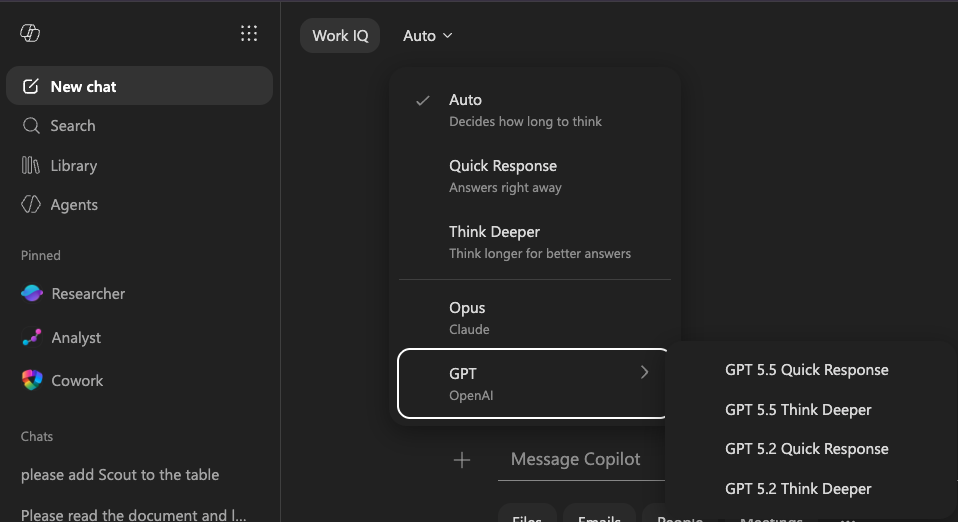
Copilot runs on OpenAI's GPT models, the same family that set the standard for what AI can do with language. And it does not stop there.
Powered by GPT
The models that started it all
Out of the box, Copilot draws on OpenAI's GPT models to draft, summarise, and reason across your work, grounded in your own documents, emails, and meetings.
Now with Claude
Claude, beautifully integrated
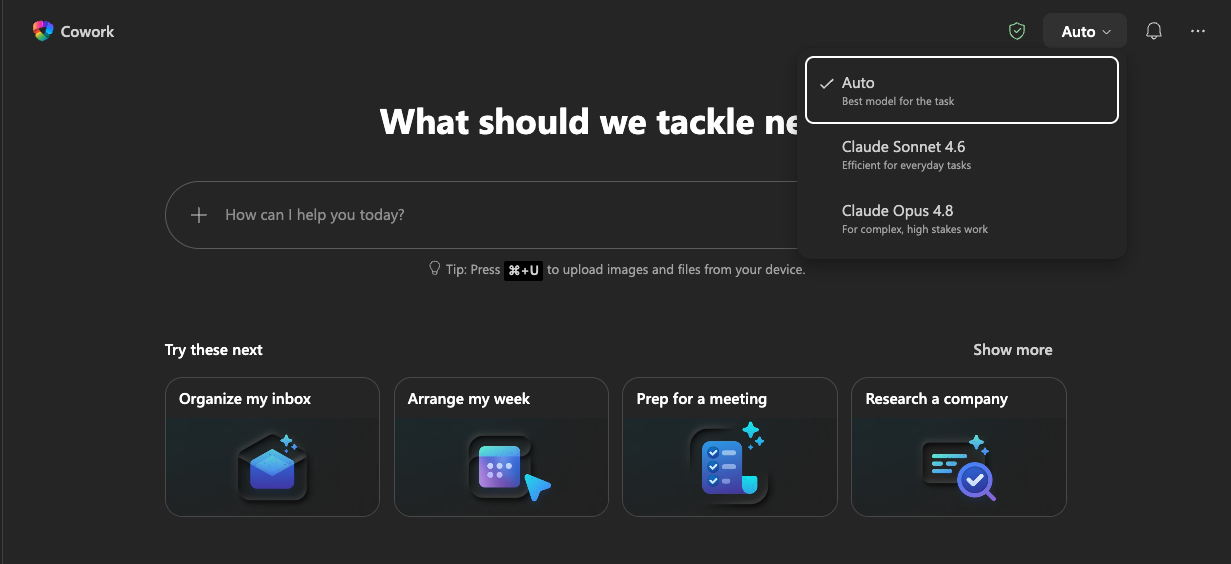
Copilot now integrates with Claude, Anthropic's family of models. Inside Copilot, your team can choose a Claude model for the kind of careful reasoning and writing it is known for, right alongside the GPT models already there.
Right where you work
And Claude sits next to Copilot, in your apps
Claude is available in-app, right next to Copilot in PowerPoint and Excel. No switching tabs, no copying between tools. The reasoning happens where the work already is.
Once your team experiences this, the way they work changes.
Beyond Chat
Copilot does more than answer questions
Copilot is not one thing. It is a set of ways to get work done, from a quick conversation to handing off a whole goal and letting it run on its own.
Cowork
An assignment you hand off
You hand off the goal and Copilot runs with it in the background, doing the file-and-task work that would otherwise sit on your to-do list. Built on Anthropic's Claude technology.
Scout
An always-on autopilot
Microsoft's first autopilot: an always-on agent that works proactively in the background, anticipating what you need. Built on the OpenClaw open-source framework.
| Tool | It is… | Use it when… |
|---|---|---|
| Copilot Chat | A conversation | You want to draft, summarise, research, or think through a problem turn by turn |
| Agents | Purpose-built helpers | You have a repeatable task in a defined area (research, analysis, meeting facilitation) |
| Cowork | An assignment | You want to hand off a multi-step goal and have it run in the background |
| Scout | An always-on autopilot | You want a proactive agent that anticipates work in the background |
The Catch
Enabled is not the same as adopted
Here is what we see when we walk into an organisation that already has Copilot: licences switched on, a handful of people who tried it once, and almost nobody using it as part of how they actually work.
The research above is what Copilot does once someone has learned where it fits into their actual job. Out of the box, Copilot is generic. It does not know your templates, your tone, your reporting cycle, or which of your meetings genuinely need a summary circulated afterwards. Somebody has to set that up, and somebody has to show your team where it fits into the work they already do.
That gap, between switched on and actually used, is what we close.
Next Steps
Two ways to close the gap
Not sure where you stand
Start with the free assessment
A clear read on how confidently your organisation can show Copilot is delivering value. 10 questions, around 5 minutes, no sign-up required.
Take the Free Assessment →Ready to get your team using it
The Working Session
Half a day inside your own Microsoft 365 environment. Two 2-hour sessions, up to 12 people, working on your real documents and your real tasks. Your team leaves with Copilot already doing part of the job, not with notes from a demo.
Book a Working Session →Want it embedded everywhere
The AI-Enabled Workplace
Maps how your work actually happens, builds Copilot and Claude into it, trains every role group, and hands over documentation so it keeps working after we leave.
Learn about the AI-Enabled Workplace →FAQ
Questions people ask about Copilot
What is Microsoft 365 Copilot?
It is Microsoft's AI assistant built into Word, Excel, PowerPoint, Outlook, and Teams. It works inside the apps your team already uses, drafting, summarising, and analysing using your own documents, emails, and meetings as context, rather than working from public web data alone.
Is Microsoft Copilot worth it?
In Microsoft's own research, 70% of early users said Copilot made them more productive, and 77% said that once they used it, they did not want to give it up. Whether it is worth it for your organisation specifically depends on whether anyone sets it up around your actual work. That is the part most organisations skip, and the part that decides whether the licence pays for itself.
Which AI models does Microsoft 365 Copilot use?
Copilot is built on OpenAI's GPT models, and it now integrates with Anthropic's Claude models too. Inside Copilot your team can choose Claude for tasks that benefit from its reasoning and writing, and Claude is also available right next to Copilot in apps like PowerPoint and Excel.
Do we need training to use Copilot properly?
You do not need training to open Copilot and ask it something. You need training to get the numbers in the research above: the version of Copilot that drafts in your tone, summarises the meetings that matter to your team, and knows your reporting cycle, does not come from opening the app. That is what a Working Session sets up.
What is the difference between Copilot and ChatGPT?
Copilot works inside Microsoft 365 with access to your own organisation's documents, emails, and meetings, under the same permissions you already have. ChatGPT and Claude are general-purpose AI tools that do not have that built-in context unless someone gives it to them. Many organisations use both: Copilot for work grounded in their own Microsoft 365 data, Claude for broader reasoning and writing tasks. Part of the AI-Enabled Workplace engagement is setting Copilot and Claude up to work together, rather than as two disconnected tools.
Do we need Copilot licences for everyone?
No. Many organisations start with the roles carrying the most repetitive drafting, reporting, or meeting load, and expand once they see the time it gives back. The AI Readiness Review is built to help you work out who that group should be.
See It For Your Team
See what this looks like for your team
The numbers above are what is possible. What you actually get back depends on whether Copilot is set up around how your organisation works. That is the part we do.
Sources
Productivity figures are drawn from Microsoft's research, the Work Trend Index Special Report on Copilot's earliest users.